Object-Oriented Programming (OOP) is one of the most widely used programming paradigms in modern software development. It provides a structured and organized way to design, develop, and maintain software by representing real-world entities as objects.
Instead of writing programs as a collection of independent functions, OOP focuses on creating objects that contain both data (attributes) and behavior (methods). This approach makes software easier to understand, reuse, test, and maintain.
Java is designed around the principles of object-oriented programming. Almost every Java application, from simple desktop programs to large enterprise systems, uses OOP concepts.
Whether you are developing Android applications, banking software, e-commerce platforms, cloud-based applications, or enterprise systems, understanding OOP is essential for writing efficient and scalable Java programs.
Table of Contents
What You Should Know Before Learning OOP Concepts in Java
Object-Oriented Programming (OOP) is one of the most important concepts in Java. Although you can start learning OOP directly, having a basic understanding of core Java concepts will make your learning journey much smoother. These prerequisites help you focus on understanding OOP concepts rather than struggling with basic programming syntax.
The good news is that you do not need to be an expert in Java before learning OOP. A basic understanding of the following topics is enough to get started.
Why Are Prerequisites Important?
Imagine you are learning to drive a car without knowing the meaning of the steering wheel, brake, or accelerator. Driving would become confusing because you would first need to understand these basic controls.
Learning OOP is similar. Before creating classes and objects, you should know the basic building blocks of Java. This foundation helps you understand OOP concepts more quickly and write programs with confidence.
Prerequisites for Learning OOP in Java
- Basic Computer Knowledge
- Java Installation and Development Environment
- Basic Java Syntax
- Variables
- Data Types
- Operators
- Control Statements
- Methods
What is Object-Oriented Programming (OOP)?
Object-Oriented Programming (OOP) is a programming paradigm (or programming approach) that organizes software around objects rather than just functions or procedures. In OOP, an object represents a real-world entity that contains both data (attributes) and behavior (methods).
In simple terms, OOP allows you to model real-world objects such as a Car, Student, Bank Account, or Mobile Phone in your program. Each object has its own characteristics (data) and actions (behavior). For example:
A Car has:
- Color
- Brand
- Model
- Speed
A Car can perform actions such as:
- Start
- Stop
- Accelerate
- Brake
In Java, you can create a Car object that stores these properties and provides methods to perform these actions. This makes your programs more organized, reusable, and easier to maintain.
Simple Definition of OOP
Object-Oriented Programming (OOP) is a programming approach in which software is designed using objects that combine data (attributes) and behavior (methods) to represent real-world entities.
Beginner-Friendly Definition
Imagine you’re building a virtual school management system. Instead of storing all the information and functions in one large program, you create separate objects, such as:
- Student
- Teacher
- Classroom
- Subject
Each object manages its own data and performs its own tasks. For example:
- A Student object stores:
- Name
- Roll Number
- Grade
- A Student object can:
- Study
- Attend a class
- Take an exam
This approach keeps the program modular, organized, and easier to understand.
Breaking Down the Term “Object-Oriented Programming”
Let’s understand each word separately.
What is an Object?
An object is a real-world entity that has:
- State (what it has)
- Behavior (what it does)
- Identity (what makes it unique)
Example: Mobile Phone
| Property | Example |
|---|---|
| State | Black color, 8 GB RAM, 256 GB storage |
| Behavior | Call, Message, Browse Internet, Take Photos |
| Identity | IMEI Number |
Every mobile phone is an individual object with its own characteristics and actions.
What Does “Oriented” Mean?
The word “oriented” means focused on or organized around something. In Object-Oriented Programming, software is organized around objects, not around standalone functions. Instead of asking:
“Which function should I write?”
You ask:
“Which objects exist in my application, and what should each object know and do?”
This shift in thinking is what makes OOP powerful for designing real-world applications.
What Does “Programming” Mean?
Programming is the process of writing instructions that tell a computer how to perform specific tasks. When you combine Object + Oriented + Programming, you get:
A way of writing programs by creating objects that represent real-world entities and define both their data and behavior.
Real-World Analogy
Imagine a school. A school consists of many real-world objects:
- Student
- Teacher
- Principal
- Classroom
- Library
Each object has its own information and responsibilities. For example, a student has the following data and behavior:
- Data
- Name
- Roll Number
- Class
- Marks
- Behavior
- Study
- Attend Class
- Submit Assignment
- Take Exam
Similarly, a teacher has the following data and behavior:
- Data
- Name
- Subject
- Employee ID
- Behavior
- Teach
- Check Assignments
- Take Attendance
Rather than placing all these details in one large program, OOP models each entity as a separate object. This separation makes the software easier to build, understand, and maintain.
Simple Java Example
// Class representing a Student
class Student {
// Attributes (State)
String name = "Rahul";
int rollNumber = 101;
// Method (Behavior)
void study() {
System.out.println(name + " is studying.");
}
}
public class Main {
public static void main(String[] args) {
// Creating an object
Student student = new Student();
// Accessing attributes
System.out.println(student.name);
System.out.println(student.rollNumber);
// Calling method
student.study();
}
}
Expected Output:
Rahul
101
Rahul is studying.
In this example:
- class Student defines a new class named Student. A class acts as a blueprint for creating student objects.
- String name = “Rahul”; declares an attribute named name and stores the student’s name Rahul.
- int rollNumber = 101; declares an integer attribute to store the roll number.
- void study() defines a method that represents the student’s behavior and prints a message indicating the student is studying.
- The statement Student student = new Student(); creates a new Student object.
- Memory is allocated for the object, and the reference is stored in the variable student.
- student.study(); calls the study() method of the Student object and executes the code defined inside the class.
Why Do OOP Concepts Matter?
As software grows, managing everything in a single file becomes difficult. OOP addresses this challenge by organizing code into logical units called objects. With OOP, you can:
- Break large applications into smaller, manageable components.
- Reuse existing code instead of rewriting it.
- Simplify maintenance and updates.
- Reduce duplication.
- Improve collaboration among developers.
- Build scalable applications that are easier to extend.
These advantages make OOP the preferred approach for developing modern applications.
Where is OOP Used?
Object-oriented programming is widely used in:
- Desktop applications
- Android applications
- Web applications
- Banking systems
- Hospital management systems
- School management systems
- E-commerce platforms
- Enterprise software
- Cloud applications
- Game development
- Financial systems
Most large-scale Java applications rely heavily on OOP principles to manage complexity and improve maintainability.
Common Misconceptions
Misconception 1
“Everything in Java is an object.”
Reality: Almost everything in Java is object-oriented, but primitive data types such as int, double, char, and boolean are not objects. They are built-in primitive types.
Misconception 2
“OOP is only about classes and objects.”
Reality: Classes and objects are the foundation, but OOP also includes key principles such as Encapsulation, Inheritance, Polymorphism, and Abstraction, which help create robust and maintainable software.
Misconception 3
“OOP makes programs complicated.”
Reality: OOP may seem more structured initially, but for medium and large applications it greatly improves organization, readability, and maintainability.
Official Documentation
For a deeper understanding of Java’s object-oriented features and language specifications, refer to the official Oracle Java documentation and the Java Language Specification.
Why Is Learning OOP Important?
Imagine building a small calculator application. A simple procedural approach may work well because the program is small. However, as the application grows into a banking system, an e-commerce platform, or a social media application with thousands of features and millions of users, managing all the code in one place becomes extremely difficult.
OOP solves this challenge by organizing software into classes and objects, where each object has a specific responsibility. This makes large applications easier to develop, test, debug, and extend.
Learning OOP teaches you how to design software the way professional developers build real-world applications. Instead of thinking only about writing code, you learn how to organize code into meaningful components that can work together efficiently.
Whether you want to become a Java developer, Android developer, backend engineer, or software architect, understanding OOP is an essential skill.
Benefits of OOP in Java
1. Better Code Organization
One of the biggest advantages of OOP is that it organizes code into classes and objects. Instead of writing all the program logic in a single file, related data and methods are grouped together.
Without OOP
All variables
All functions
All business logic
All validations
Everything in one place
As the application grows, this structure becomes difficult to understand and maintain.
With OOP
Student Class
├── Student Data
└── Student Methods
Teacher Class
├── Teacher Data
└── Teacher Methods
Course Class
├── Course Data
└── Course Methods
Each class is responsible for its own functionality, resulting in a cleaner and more maintainable codebase.
2. Code Reusability
One of the main goals of OOP is to avoid rewriting the same code.
Features like inheritance, composition, and polymorphism allow developers to reuse existing code instead of creating similar logic multiple times.
Example
Instead of writing separate code for:
- Savings Account
- Current Account
- Salary Account
You can create a common BankAccount class and reuse its functionality in specialized account types.
Benefits:
- Reduces duplicate code.
- Saves development time.
- Improves consistency.
- Simplifies maintenance.
3. Easier Maintenance
Software is rarely written once and never changed. Requirements evolve, bugs are fixed, and new features are added regularly. OOP makes maintenance easier because changes are often isolated to the relevant class.
Example
If the logic for calculating employee salaries changes, you usually need to update only the Employee class rather than searching through the entire application. This localized approach reduces the risk of introducing unintended side effects.
4. Improved Modularity
Modularity means dividing a large application into smaller, independent components. In OOP:
- Each class has a specific responsibility.
- Components interact through well-defined interfaces.
- Changes in one module have minimal impact on others.
This makes the application easier to understand, test, and extend.
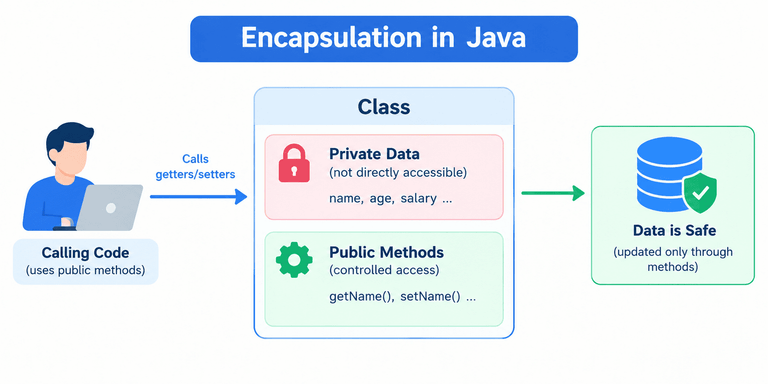
5. Better Security Through Encapsulation
OOP protects important data using encapsulation.
Instead of allowing direct access to an object’s internal data, the data is accessed through controlled methods.
Example
A bank account’s balance should not be modified directly.
Poor design
account.balance = -5000;Better design
account.withdraw(5000);The withdraw() method can validate the transaction before updating the balance, preventing invalid operations. This approach improves data integrity and application security.
6. Easier Testing and Debugging
Since each class performs a specific task, developers can test individual classes independently. For example:
- Test the
Paymentclass separately. - Test the
Orderclass separately. - Test the
Customerclass separately.
If a problem occurs in payment processing, developers can focus on the Payment class instead of investigating the entire application.
7. Scalability
Modern applications often grow over time. For example, an online shopping website may initially support:
- Customers
- Products
- Orders
Later, new features can be added, such as:
- Coupons
- Gift Cards
- Wishlist
- Reviews
- Loyalty Programs
- Multiple Payment Methods
With OOP, these features can often be implemented by adding new classes or extending existing ones, reducing the need to rewrite the entire system.
8. Improved Collaboration
Large software projects are developed by teams rather than individuals. OOP enables multiple developers to work on different parts of the application simultaneously. For example:
| Developer | Responsibility |
|---|---|
| Developer A | Customer Module |
| Developer B | Order Module |
| Developer C | Payment Module |
| Developer D | Inventory Module |
Because each module has clearly defined responsibilities, team members can work independently with fewer conflicts.
9. Real-World Modeling
OOP models software using real-world entities, making applications more intuitive to design and understand.
Example: Library Management System
Objects include:
- Book
- Student
- Librarian
- Library Card
- Fine
- Issue Record
Each object stores its own information and provides methods to perform relevant actions, closely reflecting how a real library operates.
10. Industry Standard Approach
Most modern software systems are built using object-oriented principles. Examples include:
- Banking applications
- Hospital management systems
- E-commerce platforms
- ERP systems
- CRM software
- Android applications
- Enterprise Java applications
- Cloud-based services
Learning OOP prepares you to work on these types of projects and aligns your skills with industry practices.
Real-World Analogy
Imagine building a city. Without planning, all buildings, roads, utilities, and public services would be mixed together, creating confusion and making future expansion difficult. Instead, a well-designed city is divided into separate areas:
- Residential
- Commercial
- Industrial
- Educational
- Healthcare
Each area has a specific purpose but works together as part of the larger city.
OOP follows the same principle. It divides a software application into independent classes and objects, each with a clear responsibility, resulting in a well-organized and scalable system.