Encapsulation is one of the four fundamental principles of Object-Oriented Programming (OOP) in Java. It helps us to combine data and the methods that operate on that data into a single unit while controlling how other parts of a program access and modify the data.
In Java, we commonly implement encapsulation by declaring class variables as private and providing public methods to access or modify them when necessary.
For example, consider a bank account. You can deposit or withdraw money, but you should not be able to change the account balance directly without following the bank’s rules. Encapsulation helps us implement this kind of controlled access in a Java program.
In this tutorial, we will learn what encapsulation is, how encapsulation works, how to implement it using Java code, and how to apply it in practical projects such as a bank account management system. We will also explore its advantages, and limitations.
Table of Contents
What is Encapsulation in Java
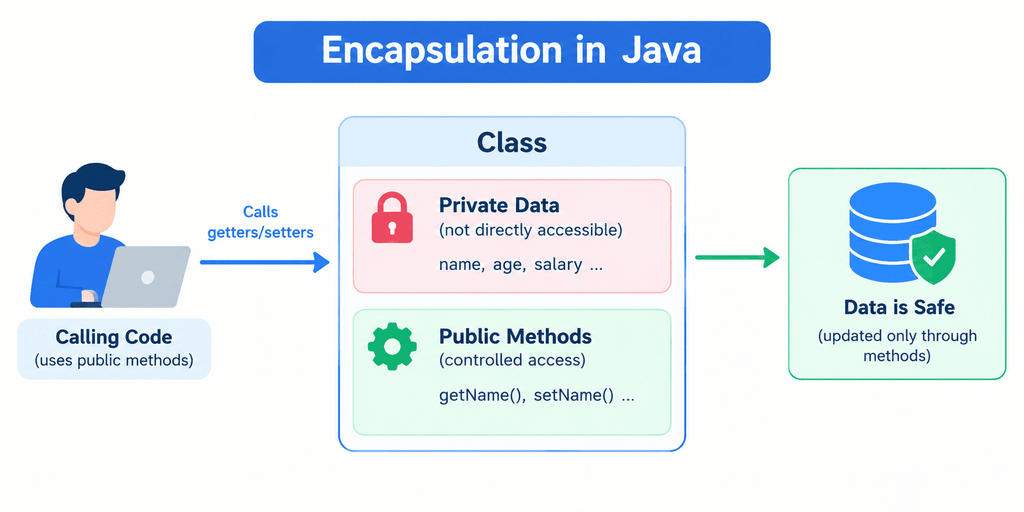
Encapsulation in Java is an OOP concept that combines data (variables) and the methods that operate on that data into a single unit called a class. It also allows a class to control access to its internal data.
In simple words, encapsulation means keeping data and its related methods together while controlling how other classes access or modify that data.
We commonly achieve encapsulation by declaring instance variables as private and providing appropriate public methods to access or update them.
General Syntax of Encapsulation in Java
The following is the general syntax for implementing encapsulation using private fields, a getter, and a setter.
class ClassName {
// Private data member
private DataType variableName;
// Getter method
public DataType getVariableName() {
return variableName;
}
// Setter method
public void setVariableName(DataType value) {
variableName = value;
}
}
Explanation of the syntax:
class ClassNamedeclares a Java class.private DataType variableNamedeclares a private field that cannot be accessed directly by unrelated classes.public DataType getVariableName()declares a public method that returns the field’s value.return variableNamereturns the current value.public void setVariableName(DataType value)declares a method that can update the field.variableName = valueassigns the supplied value to the field.
Getter and Setter Naming Conventions
Java commonly follows these naming conventions:
| Field | Getter | Setter |
|---|---|---|
name | getName() | setName(String name) |
age | getAge() | setAge(int age) |
salary | getSalary() | setSalary(double salary) |
active (boolean) | isActive() | setActive(boolean active) |
These are conventions rather than absolute requirements. Boolean getters can also use getActive(), depending on the class design and conventions being followed.
Simple Example of Encapsulation in Java
Let us consider a student who has a name and age. We want to prevent other classes from directly changing the student’s age to an invalid value. We can use encapsulation to control how the age is updated.
class Student {
private int age;
public void setAge(int age) {
if (age > 0) {
this.age = age;
} else {
System.out.println("Invalid age!");
}
}
public int getAge() {
return age;
}
}
public class Main {
public static void main(String[] args) {
Student s = new Student();
s.setAge(20);
System.out.println("Age: " + s.getAge());
s.setAge(-5);
System.out.println("Age: " + s.getAge());
}
}
Output
Age: 20
Invalid age!
Age: 20
Step-by-step explanation
private int age;declares a private variable that other classes cannot access directly.setAge(int age)provides a controlled way to update the student’s age.if (age > 0)checks whether the supplied age is valid according to this example’s rule.this.age = age;updates the instance variable only when the condition is satisfied. The this keyword refers to the current object.getAge()returns the current value of the private variable.- When the program attempts to set the age to -5, the method rejects the value, so the previous age remains 20.
This example demonstrates how encapsulation can help maintain valid object data. The validation rule is illustrative; a real student-management system may need additional rules depending on its requirements.
Why Is Encapsulation Important in Java?
Encapsulation is important in Java because it helps you to protect an object’s internal data, control how that data changes, and build maintainable applications.
Without encapsulation, other classes might modify an object’s variables directly, potentially creating invalid or inconsistent data. Encapsulation allows a class to define how other parts of a program interact with its data.
Let’s understand the major benefits with simple examples.
1. Protects Data from Direct Access
Encapsulation allows us to declare variables as private, preventing other classes from accessing them directly. For example, consider a bank account. We should not allow other classes to change its balance by assigning an arbitrary value.
class BankAccount {
private double balance = 5000.0;
}
Now, another class cannot directly execute account.balance = -1000.0; because balance is private. This helps prevent uncontrolled modifications to the account balance.
2. Provides Controlled Access to Data
Encapsulation allows a class to decide which operations other classes can perform. For example, instead of allowing direct access to a bank account’s balance, we can provide a deposit() method.
class BankAccount {
private double balance = 5000.0;
public void deposit(double amount) {
if (amount > 0) {
balance += amount;
} else {
System.out.println("Invalid deposit amount.");
}
}
public double getBalance() {
return balance;
}
}
public class Main {
public static void main(String[] args) {
BankAccount account = new BankAccount();
account.deposit(1000.0);
System.out.println(account.getBalance());
}
}
Output
6000.03. Maintains Data Integrity
Data integrity means keeping data accurate and consistent. Encapsulation helps maintain data integrity by checking input before modifying an object’s state. For example, a student-management system may reject negative marks.
class Student {
private int marks;
public void setMarks(int marks) {
if (marks >= 0 && marks <= 100) {
this.marks = marks;
} else {
System.out.println("Marks must be between 0 and 100.");
}
}
public int getMarks() {
return marks;
}
}
Here, the setter accepts marks only between 0 and 100. The validation rule prevents invalid values from being stored through this method.
4. Improves Code Maintainability
Encapsulation makes it easier to change a class’s internal implementation without requiring changes to every class that uses it. For example, a class might initially store a person’s full name in one variable. Later, it could store the first and last names separately while preserving a public getFullName() method.
As long as the public method’s behavior remains compatible, calling code may not need to change. This is particularly useful in large applications with many interacting classes.
5. Reduces Dependencies Between Classes
When other classes access internal fields directly, they become dependent on the internal structure of those classes. Encapsulation reduces this dependency by encouraging callers to use public methods rather than relying on implementation details. For example:
- A calling class uses account.deposit(500).
- It does not need to know how the account calculates or stores its balance.
- The BankAccount implementation can change without necessarily changing the calling code.
This helps make software easier to extend and maintain.
6. Improves Flexibility
Encapsulation lets you change internal logic while keeping a stable public interface. For example, a Product class might initially calculate a discounted price using a simple formula. Later, it might apply different discount rules based on product type.
If other classes call a public method such as getDiscountedPrice(), the internal calculation can change without requiring every caller to implement the new rules.
7. Supports Better Testing and Debugging
When data changes through defined methods, developers can focus on those methods when testing an object’s behavior. For example, a withdraw() method can be tested with:
- A valid withdrawal amount.
- A negative amount.
- An amount greater than the available balance.
- A zero amount.
This makes it easier to identify where invalid state changes occur.
Real-World Analogy of Encapsulation in Java
To understand encapsulation in Java easily, let’s look at two familiar real-world examples: an ATM machine and a bank account.
The main idea is simple: you can perform permitted operations without directly accessing or controlling the internal workings of a system.
1. ATM Machine: A Real-Life Example of Encapsulation
Imagine that you want to withdraw ₹2,000 from an ATM machine. You insert your card, enter your PIN, select the withdrawal option, and enter the amount. The ATM processes your request and dispenses the money if the transaction is authorized.
You do not directly access the bank’s database or modify your account balance yourself. The ATM system performs the necessary checks and processes your request. This example helps illustrate encapsulation.
How does an ATM relate to Java encapsulation?
| Real-world ATM | Java concept |
|---|---|
| ATM system | Java class |
| Account balance stored internally | Private variable |
| Withdrawal option | Public method |
| PIN and transaction checks | Validation and authorization logic |
| Updated account balance | Object state after an operation |
For example, a Java bank account class might provide a withdraw() method. That method can check the withdrawal amount and available balance before updating the account. The calling code requests a withdrawal without directly changing the private balance.
2. Bank Account: Another Example of Encapsulation
Imagine that your bank account contains ₹10,000. You want to deposit another ₹2,000. Instead of changing the balance directly, you use the bank’s deposit service.
The system processes the transaction and updates your balance to ₹12,000. In Java, we can represent this behavior using a class.
class BankAccount {
private double balance = 10000.0;
public void deposit(double amount) {
if (amount > 0) {
balance += amount;
}
}
public double getBalance() {
return balance;
}
}
public class Main {
public static void main(String[] args) {
BankAccount account = new BankAccount();
account.deposit(2000.0);
System.out.println("Balance: " + account.getBalance());
}
}
Output
Balance: 12000.0Step-by-step explanation:
private double balance = 10000.0;stores the initial balance inside the object.deposit(double amount)provides a controlled way to deposit money.if (amount > 0)checks that the deposit amount is positive.balance += amount;adds the deposit to the current balance.getBalance()returns the balance without allowing the caller to change it directly.- The program prints the updated balance of ₹12,000, represented as
12000.0.
What Should You Remember?
The ATM and bank account examples teach us three important points:
- Encapsulation groups data and behavior: A Java class contains data and the methods that operate on it.
- Encapsulation controls access: Private fields prevent unrelated classes from modifying the data directly.
- Encapsulation supports validation: Public methods can check requests before changing an object’s state.
Remember that encapsulation does not automatically provide authentication or guarantee security. It provides a structure for controlling access within a program.
How Does Encapsulation Work in Java?
Encapsulation in Java works by combining data and related methods inside a class while restricting direct access to internal data. The class provides selected methods through which other classes can read the data or request changes to it.
We commonly implement encapsulation using the private and public access modifiers. Let’s understand how it works step by step.
1. Declare Variables as Private
The first step is to declare the class variables as private. A private variable can be accessed directly only from within the class where it is declared. For example:
class Employee {
private double salary = 30000.0;
}
Here, salary is a private variable. Another class cannot directly access it through an Employee object. This helps prevent uncontrolled changes to the employee’s salary.
2. Create Public Getter Methods
A getter is a method that returns the value of a field. If another class needs to read the salary, the Employee class can provide a public getter.
class Employee {
private double salary = 30000.0;
public double getSalary() {
return salary;
}
}
Explanation:
private double salarystores the salary inside the class.public double getSalary()declares a public method that returns adouble.return salary;returns the current salary to the caller.
A getter method allows reading the value without providing direct access to the private field.
3. Create Public Setter Methods
A setter is a method that updates a field’s value. For example:
class Employee {
private double salary = 30000.0;
public void setSalary(double salary) {
if (salary >= 0) {
this.salary = salary;
} else {
System.out.println("Invalid salary.");
}
}
public double getSalary() {
return salary;
}
}
Explanation:
setSalary(double salary)provides a controlled way to change the salary.if (salary >= 0)checks that the new salary is not negative.this.salary = salary;updates the current object’s field when the condition passes.- If the supplied salary is negative, the method rejects it.
A setter should apply the validation rules appropriate to the application. In some classes, a setter may not be necessary at all.
4. Access the Private Data Through Public Methods
Now, let’s use the Employee class in a complete program.
class Employee {
private double salary = 30000.0;
public void setSalary(double salary) {
if (salary >= 0) {
this.salary = salary;
} else {
System.out.println("Invalid salary.");
}
}
public double getSalary() {
return salary;
}
}
public class Main {
public static void main(String[] args) {
Employee emp = new Employee();
System.out.println("Initial Salary: " + emp.getSalary());
emp.setSalary(40000.0);
System.out.println("Updated Salary: " + emp.getSalary());
emp.setSalary(-5000.0);
System.out.println("Final Salary: " + emp.getSalary());
}
}
Output
Initial Salary: 30000.0
Updated Salary: 40000.0
Invalid salary.
Final Salary: 40000.0
Step-by-step explanation
- The
Employeeclass declaressalaryas private. - The program creates an
Employeeobject namedemp. emp.getSalary()retrieves the initial salary of30000.0.emp.setSalary(40000.0)updates the salary because the value passes validation.emp.setSalary(-5000.0)is rejected because the value is negative.- The final getter call returns
40000.0, showing that the invalid update did not change the salary.
Advantages of Encapsulation in Java
The major advantages of encapsulation in Java are:
- Data Hiding: Encapsulation restricts direct access to class variables by declaring them private.
- Controlled Access to Data: It allows a class to control how other classes read or modify its internal data through public methods.
- Improved Data Integrity: It helps prevent invalid data from being stored by validating values before updating an object’s state.
- Better Code Maintainability: You can modify a class’s internal implementation without necessarily changing the code that uses it.
- Reduced Coupling: It reduces dependencies between classes by hiding internal implementation details behind public methods.
- Greater Flexibility: You can change internal logic while keeping the public interface consistent.
- Easier Testing and Debugging: Defined methods provide clear points for testing operations and identifying errors.
- Improved Modularity: Encapsulation groups related data and methods into a single class, making code easier to organize.
- Code Reusability: Well-designed encapsulated classes can be reused in different parts of an application or across projects.
Limitations of Encapsulation in Java
Although encapsulation offers several benefits, it also has some limitations that developers should understand.
- Increased Code: Implementing encapsulation may require additional methods, such as getters and setters, which can increase the amount of code.
- Additional Development Time: Developers may need extra time to design access methods and implement appropriate validation rules.
- Unnecessary Getters and Setters: Creating getters and setters for every field without considering the class’s requirements can weaken encapsulation and expose unnecessary operations.
- Complexity for Beginners: Beginners may find private variables, access modifiers, getters, setters, and validation confusing at first.
- Validation Requires Careful Design: If developers implement incomplete or incorrect validation, invalid data may still enter the application through permitted methods.