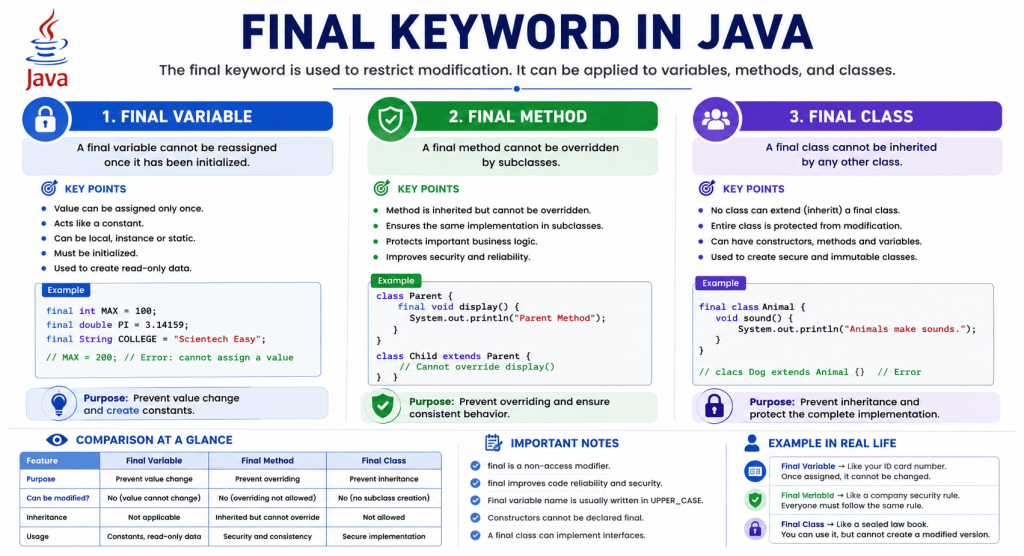
The final keyword in Java is one of the most important non-access modifiers used to restrict modification. You can apply it to variables, methods, and classes.
- Final variable → The variable can be assigned a value only once.
- Final method → The method cannot be overridden by subclasses.
- Final class → The class cannot be inherited (extended).
When you declare something as final, you tell the compiler that its value, behavior, or inheritance relationship should not change after a certain point. As a result, the final keyword helps prevent unwanted changes in a program.
Table of Contents
Final Variable in Java
A final variable in Java is a variable whose value or reference can be assigned only once. When you declare a variable as final, you can assign a value only once. After you assign a value to a final variable, Java does not allow you to assign a new value to it. This restriction helps you to prevent accidental modifications in the program.
We commonly use final variables to define constants such as PI, MAX_SIZE, MIN_AGE, and other values that should remain unchanged throughout the program.
Syntax of a Final Variable in Java
The general syntax of a final variable in Java is:
final dataType variableName = value;Example 1: Final Variable
public class FinalVariableDemo {
public static void main(String[] args) {
final int AGE = 25;
System.out.println("Age = " + AGE);
}
}
Output:
Age = 25In this example program, the variable AGE is declared as a final variable and initialized with the value 25. Java stores the value 25 in the variable AGE. Since the variable AGE is declared as final, its value can be assigned only once. Once assigned, you cannot change its value.
When the statement System.out.println(“Age = ” + AGE); executes, the program prints the stored value. Since we do not attempt to modify the value of AGE, it compiles and runs successfully.
Example 2: Trying to Modify a Final Variable
public class FinalVariableDemo {
public static void main(String[] args) {
final int AGE = 25;
AGE = 30; // Compilation Error
}
}
Output:
Compilation Error: cannot assign a value to final variable AGEWhen the compiler reads the statement final int AGE = 25;, it marks AGE as a final variable. The next statement, AGE = 30; tries to assign a new value to AGE.
Since a final variable can be assigned only once, Java rejects the second assignment and generates a compilation error. The program does not compile because Java checks this rule during compilation.
Why Should You Use Final Variables in Java?
There are several benefits of using final variables in Java:
- A final variable prevents accidental modification of important values.
- It makes your code easier to understand.
- It improves code reliability and maintainability.
- It helps define constants in a program.
- A final variable also helps to reduce bugs caused by unintended value changes.
For example, mathematical constants such as PI should never change. Therefore, it must be declared as final in the program.
final double PI = 3.141592653589793;Blank Final Variable in Java
A blank final variable in Java is a final variable that is declared without an initial value. Unlike a normal final variable, Java allows you to assign a value later.
However, you must assign the value exactly once before the variable is used. Blank final variables are commonly initialized inside constructors because each object may require a different value.
Example 3: Blank Final Variable
public class Student {
final int rollNo;
Student(int rollNo) {
this.rollNo = rollNo;
}
void display() {
System.out.println("Roll Number = " + rollNo);
}
public static void main(String[] args) {
Student s = new Student(101);
s.display();
}
}
Output:
Roll Number = 101In this example, initially, the variable final int rollNo; does not contain a value. When the constructor executes, Java assigns the value 101 to the final variable.
After this assignment, Java does not allow another assignment to rollNo. Each Student object can receive a different roll number, but once assigned, the roll number of that object cannot change.
Final Reference Variable in Java
Many beginners think that a final object becomes completely immutable. This is not correct. In Java, final applies to the reference, not necessarily to the object.
A final reference variable cannot refer to another object after assignment. However, if the object itself is mutable, you can still modify its internal data.
This is one of the most important concepts to understand when learning the final keyword in Java.
Example 4: Modifying the Object Through a Final Reference
class Student {
String name;
}
public class FinalReferenceDemo {
public static void main(String[] args) {
final Student s = new Student();
s.name = "Deepak";
System.out.println(s.name);
}
}
Output:
DeepakIn this example program, the statement final Student s = new Student(); creates a Student object and stores its reference in the final variable s.
The statement s.name = “Deepak”; does not change the reference variable. Instead, it changes the value of the name field inside the same object.
Since the reference still points to the original object, Java allows this operation. Therefore, the program executes successfully and prints Deepak on the console.
Example 5: Reassigning a Final Reference Variable
class Student {
}
public class Test {
public static void main(String[] args) {
final Student s = new Student();
s = new Student(); // Compilation Error
}
}
Output:
Compilation Error: cannot assign a value to final variable sFinal Method in Java
A final method in Java is a method that cannot be overridden by a subclass. In other words, a final method is a method whose implementation cannot be changed by subclasses through overriding.
When a parent class declares a method as final, every child class inherits that method, but no child class is allowed to provide its own implementation of that method. However, a final method can be inherited and called, but it cannot be overridden.
We usually use the final keyword to protect important methods whose behavior should never be changed. This helps maintain program correctness, security, and consistency.
Why Use a Final Method in Java?
There are several situations where making a method final is useful:
- To prevent child classes from changing important business logic.
- To protect security-related methods from modification.
- To ensure the same behavior across all subclasses.
- To avoid accidental overriding by other developers.
- To make the program more reliable and maintainable.
For example, a banking application may have a method that verifies a user’s identity before processing a transaction. If subclasses could override this method, they might accidentally or intentionally skip the verification process. Declaring the method as final prevents such changes.
Syntax of Final Method
The general syntax to declare a final method in Java is:
final returnType methodName()
{
// Method body
}
Example 6: Use of Final Method
class Parent
{
final void display()
{
System.out.println("Parent Display Method");
}
}
class Child extends Parent
{
}
public class Test
{
public static void main(String[] args)
{
Child c = new Child();
c.display();
}
}
Output:
Parent Display MethodIn this example:
- The Parent class contains a method named display(), which is declared as final.
- The Child class extends the Parent class.
- Since the display() method is inherited, the Child object can call it.
- The program prints “Parent Display Method”.
Although the child class can use the method, it cannot replace it with a different implementation because it is declared as final.
Example 7: Trying to Override a Final Method
class Parent
{
final void display()
{
System.out.println("Parent Method");
}
}
class Child extends Parent
{
void display()
{
System.out.println("Child Method");
}
}
Output:
Compilation Error: Cannot override the final method from ParentIn this example program:
- The display() method in the Parent class is declared as final.
- The Child class tries to define another method with the same name, return type, and parameter list.
- This is an attempt to override the parent method.
- Java does not allow overriding a final method, so the compiler reports an error and the program does not compile.
This rule ensures that the original implementation provided by the parent class remains unchanged in every subclass.
Example 8: Real-Life Example of Final Method in Java
class University
{
final void displayUniversityName()
{
System.out.println("ABC University");
}
}
class EngineeringCollege extends University
{
}
public class Test
{
public static void main(String[] args)
{
EngineeringCollege college = new EngineeringCollege();
college.displayUniversityName();
}
}
Output:
ABC UniversityThe university name should remain the same for every affiliated college. By declaring displayUniversityName() as final, Java ensures that no subclass can change the university name.
Key Points About Final Methods
- A final method cannot be overridden in a subclass.
- A final method is inherited by subclasses.
- A final method can be called normally using an object of the subclass.
- A final method can be overloaded because overloading creates a different method with a different parameter list.
- A method declared as both private and final is valid, although final has no practical effect because private methods are not inherited and therefore cannot be overridden.
Final Class in Java
A final class in Java is a class that cannot be extended (inherited) by another class. When a class is declared as final, no other class is allowed to become its subclass. In other words, Java prevents inheritance of a final class.
Although objects of a final class can be created and its methods can be used normally, Java does not allow any class to extend it.
We usually use the final keyword to protect an entire class from being modified through inheritance. The final class helps to protect important implementations, improve security, and create immutable classes.
Why Use a Final Class in Java?
There are several situations where making a class final is useful:
- To prevent other developers from extending the class.
- To protect sensitive or security-related functionality.
- To ensure the implementation remains unchanged.
- To maintain consistent behavior throughout the application.
- To design immutable classes whose objects cannot be modified after creation.
For example, a banking application may contain a class responsible for encrypting customer passwords. If another class could inherit and modify its behavior, the application’s security might be compromised. Declaring the class as final prevents this.
Syntax of Final Class
The general syntax to declare a final class in Java is:
final class ClassName
{
// Data members
// Methods
}
Example 9: Use of Final Class
final class Animal
{
void sound()
{
System.out.println("Animals make sounds.");
}
}
public class Test
{
public static void main(String[] args)
{
Animal a = new Animal();
a.sound();
}
}
Output:
Animals make sounds.In this example:
- The Animal class is declared as final. Since it is a final class, no other class can inherit it.
- An object of the Animal class is created.
- The sound() method is called normally.
- The program prints “Animals make sounds” on the console.
A final class behaves like any normal class except that it cannot be extended.
Example 10: Trying to Inherit a Final Class
final class Animal
{
void sound()
{
System.out.println("Animals make sounds.");
}
}
class Dog extends Animal
{
}
Output:
Compilation Error: Cannot inherit from final AnimalIn this example program:
- The Animal class is declared as final.
- The Dog class tries to extend the Animal class.
- Java does not allow inheritance from a final class.
- Therefore, the compiler reports an error and the program does not compile.
This rule ensures that the implementation of the final class cannot be changed by creating subclasses
Example 11: Payment Application
final class PaymentGateway
{
void processPayment()
{
System.out.println("Payment processed successfully.");
}
}
public class Test
{
public static void main(String[] args)
{
PaymentGateway gateway = new PaymentGateway();
gateway.processPayment();
}
}
Output:
Payment processed successfully.The PaymentGateway class contains important payment processing logic. By declaring it as final, Java ensures that no developer can create a subclass and change how payments are processed.
Common Example: String Class
One of the most well-known examples of a final class in Java is the String class.
String name = "John";The String class is declared as final, so no class can extend it.
This helps Java maintain:
- Immutability
- Security
- Reliable behavior
- Better performance in many situations
Trying to inherit from String results in a compilation error.
class MyString extends String
{
}
Output:
Compilation Error: Cannot inherit from final StringKey Point About Final Classes
- A final class cannot be inherited.
- A final class can contain constructors.
- A final class can contain instance methods, static methods, and final methods.
- Objects of a final class can be created normally.
- A final class can implement one or more interfaces.
- A final class cannot be declared as abstract because an abstract class is meant to be inherited, while a final class cannot be inherited.
Difference Between Final Variable, Final Method, and Final Class in Java
Understanding these differences is important because each serves a different purpose in object-oriented programming.
| Feature | Final Variable | Final Method | Final Class |
|---|---|---|---|
| Purpose | Prevents the value of a variable from being changed after assignment. | Prevents subclasses from overriding the method. | Prevents other classes from inheriting the class. |
| Applied To | Variables (local, instance, or static variables) | Methods | Classes |
| Can Be Modified? | No. The value can be assigned only once. | No overriding is allowed. The method implementation cannot be changed in subclasses. | No subclass can be created. The class cannot be extended. |
| Inheritance | Not applicable | The method is inherited but cannot be overridden. | Inheritance is completely prohibited. |
| Object Creation | Not applicable | Objects of subclasses can still be created. | Objects of the final class can be created normally. |
| Primary Usage | Creating constants and read-only variables. | Protecting important methods and ensuring consistent behavior. | Protecting the entire implementation from inheritance. |
| Compiler Restriction | Reports an error if the variable is reassigned. | Reports an error if a subclass tries to override the method. | Reports an error if a class tries to extend the final class. |