Inheritance in Java is an object-oriented programming (OOP) mechanism that allows one class to acquire accessible fields and methods from another class. It helps you reuse existing code, extend functionality, and establish relationships between classes.
In Java, the class that provides its functionality is called the parent class or superclass, while the class that inherits from it is called the child class or subclass.
Java uses the extends keyword to establish inheritance between classes. Let’s understand this with a simple example.
Imagine that you have a parent class called Animal and a child class called Dog.
- The
Animalclass defines a common behavior: eating. - The
Dogclass inherits that behavior fromAnimal. - The
Dogclass can also define its own behavior, such as barking.
Instead of writing the eat() method again in the Dog class, we can reuse the method defined in Animal. This is the basic idea behind inheritance in Java.
Table of Contents
Syntax of Inheritance in Java
Inheritance in Java allows one class to acquire accessible fields and methods from another class. Java uses the extends keyword to establish an inheritance relationship between a parent class and a child class. The general syntax of inheritance in Java is:
class ParentClass {
// Fields and methods of the parent class
}
class ChildClass extends ParentClass {
// Additional fields and methods of the child class
}
Explanation of the syntax
class: Declares a class in Java.ParentClass: The class whose accessible members can be inherited.ChildClass: The class that inherits from the parent class.extends: The keyword that establishes the inheritance relationship. This keyword is used when one class inherits from another class.- The child class body: Contains additional fields, constructors, and methods specific to the child class.
Java Inheritance Example
Let’s write a simple Java program to demonstrate inheritance.
class Animal {
void eat() {
System.out.println("Animal is eating.");
}
}
class Dog extends Animal {
void bark() {
System.out.println("Dog is barking.");
}
}
public class Main {
public static void main(String[] args) {
Dog dog = new Dog();
dog.eat();
dog.bark();
}
}
Output:
Animal is eating.
Dog is barking.
Step-by-Step Explanation
Step 1: Create the parent class
class Animal {
void eat() {
System.out.println("Animal is eating.");
}
}Animalis the parent class.- The
eat()method prints a message. - This method will be available to the
Dogsubclass through inheritance.
Step 2: Create the child class
class Dog extends Animal {
void bark() {
System.out.println("Dog is barking.");
}
}Dogis the child class.- The
extends Animaldeclaration establishes inheritance. - The
Dogclass inherits the accessibleeat()method. - The
bark()method adds behavior specific toDog.
Step 3: Create an object
Dog dog = new Dog();This statement creates a Dog object and stores its reference in the variable dog.
Step 4: Call the inherited method
dog.eat();The eat() method is defined in Animal, but the Dog object can call it because Dog extends Animal.
Step 5: Call the child class’s own method
dog.bark();The bark() method belongs to Dog, so the object can call it directly.
Step 6: Understand the result
The program prints both messages because the Dog object can use the inherited eat() method and its own bark() method.
How Does Inheritance Work in Java?
In Java, inheritance establishes a relationship between classes. The child class can reuse accessible functionality from the parent class without duplicating its implementation.
The process works as follows:
- Declare a parent class containing common fields or methods.
- Declare a child class using the extends keyword.
- Create an object of the child class.
- Use the object to access accessible inherited members and the child class’s own members.
For example, a Car class can extend a Vehicle class. The Vehicle class might define a start() method, while Car defines a displayModel() method. A Car object can use both methods.
Here is the complete Java program demonstrating how the Car class inherits the start() method from the Vehicle class and defines its own displayModel() method.
class Vehicle {
void start() {
System.out.println("Vehicle starts.");
}
}
class Car extends Vehicle {
void displayModel() {
System.out.println("Car model: Toyota Corolla");
}
}
public class Main {
public static void main(String[] args) {
Car car = new Car();
car.start();
car.displayModel();
}
}
Output:
Vehicle starts.
Car model: Toyota Corolla
Step-by-Step Explanation
Vehicleclass: Defines thestart()method, which prints a message when called.Car extends Vehicle: Establishes inheritance, allowingCarto use the accessiblestart()method.displayModel()method: Defines additional behavior specific to theCarclass.Car car = new Car();: Creates an object of theCarclass.car.start();: Calls the inherited method fromVehicle.car.displayModel();: Calls the method defined inCar.
Key point: Since Car extends Vehicle, a Car object can use both the inherited start() method and its own displayModel() method.
Inheritance with Variables in Java
In Java, a child class can access eligible variables inherited from its parent class. This allows the child class to reuse data defined in the parent class without declaring the same variables again.
For example, suppose a parent class named Student contains a variable called name. A child class named CollegeStudent can access the inherited name variable and display its value. This helps reduce code duplication and makes related classes easier to maintain.
class Student {
String name = "Rahul";
int age = 20;
}
class CollegeStudent extends Student {
void display() {
System.out.println("Student Name: " + name);
System.out.println("Student Age: " + age);
}
}
public class Main {
public static void main(String[] args) {
CollegeStudent s = new CollegeStudent();
s.display();
}
}
Output:
Student Name: Rahul
Student Age: 20
Explanation of the Program
- Parent class (
Student): Declares two instance variables,nameandage, and initializes them with values. - Child class (
CollegeStudent): ExtendsStudent, so it can access the inherited variables because they are accessible within the same package. display()method: Prints the values ofnameandagewithout declaring these variables again in the child class.- Object creation:
new CollegeStudent()creates an object of the child class. - Method call:
s.display()displays the inherited variable values.
How Does It Work?
The CollegeStudent class does not declare its own name or age variables. Instead, it uses the variables defined in Student. This demonstrates that inheritance applies to eligible fields as well as methods.
Types of Inheritance in Java
Java inheritance is commonly classified into different types based on the relationships between parent and child classes.
The main inheritance types are:
- Single inheritance
- Multilevel inheritance
- Hierarchical inheritance
- Multiple inheritance
- Hybrid inheritance
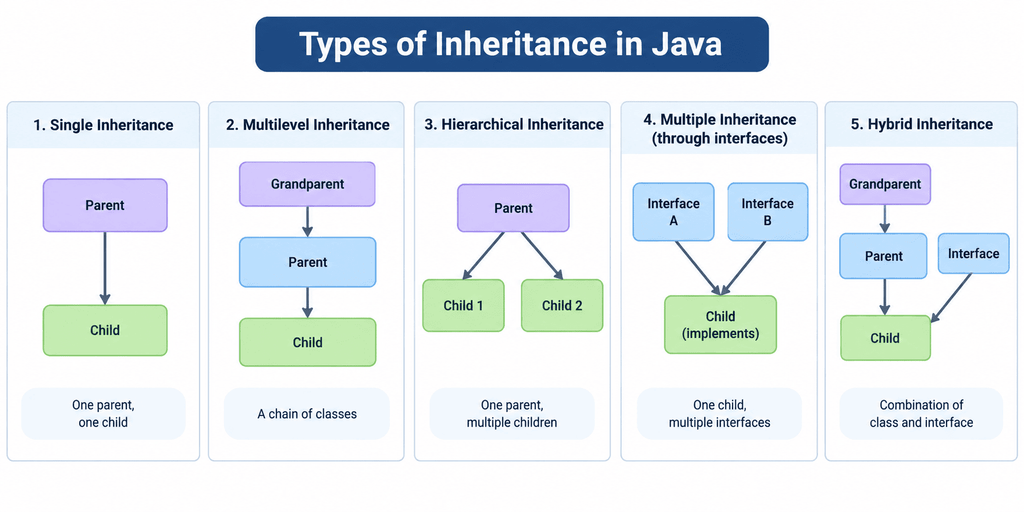
Important Note: Java supports single, multilevel, and hierarchical inheritance through classes. It does not support multiple inheritance through classes, but it supports multiple inheritance of type through interfaces. Hybrid inheritance can be modeled using a combination of class inheritance and interfaces.
Single Inheritance in Java
Single inheritance in Java occurs when one child class inherits from one parent class. For example, a Dog class can inherit the properties and methods of an Animal class.
The basic syntax of single inheritance in Java is:
class Parent {
// Fields and methods
}
class Child extends Parent {
// Additional fields and methods
}
Here, the Child class inherits accessible members from the Parent class using the extends keyword.
Example of Single Inheritance in Java
Let’s understand single inheritance using a real-world example of an Employee and Manager. In this example, the Manager class inherits the employee details from the Employee class and adds its own functionality.
class Employee {
String name = "Rahul";
int salary = 30000;
void displayEmployeeDetails() {
System.out.println("Employee Name: " + name);
System.out.println("Employee Salary: " + salary);
}
}
class Manager extends Employee {
String department = "IT";
void displayDepartment() {
System.out.println("Department: " + department);
}
}
public class Main {
public static void main(String[] args) {
Manager m = new Manager();
m.displayEmployeeDetails();
m.displayDepartment();
}
}
Output:
Employee Name: Rahul
Employee Salary: 30000
Department: IT
Explanation of the Program
Employeeclass: Defines two variables,nameandsalary, and a method nameddisplayEmployeeDetails().Manager extends Employee: TheManagerclass inherits the accessible fields and method from theEmployeeclass.- Manager-specific variable: The
departmentvariable stores the manager’s department. displayDepartment()method: Displays the department associated with the manager.- Object creation: The statement
Manager m = new Manager();creates an object of theManagerclass. - Calling inherited methods: The statement
m.displayEmployeeDetails();calls a method defined inEmployee. - Calling the child class method: The statement
m.displayDepartment();calls a method defined inManager.
Multilevel Inheritance in Java
Multilevel inheritance in Java occurs when a class inherits from another child class, creating a chain of inheritance. For example, Animal is the parent class, while Dog inherits from Animal and Puppy inherits from Dog. So, the Puppy class can access eligible methods inherited through both Dog and Animal.
The general syntax of multilevel inheritance in Java is:
class Grandparent {
// Members of class Grandparent
}
class Parent extends Grandparent {
// Members of class Parent
}
class Child extends Parent {
// Members of class Child
}
In this example, Parent inherits from Grandparent, and Child inherits from Parent.
Example of Multilevel Inheritance in Java
Let’s understand multilevel inheritance in Java using a real-world example of a person, an employee, and a manager.
In this example:
Personis the parent class.Employeeinherits fromPerson.Managerinherits fromEmployee.
class Person {
String name = "Rahul";
void displayName() {
System.out.println("Name: " + name);
}
}
class Employee extends Person {
int employeeId = 101;
void displayEmployeeId() {
System.out.println("Employee ID: " + employeeId);
}
}
class Manager extends Employee {
String department = "IT";
void displayDepartment() {
System.out.println("Department: " + department);
}
}
public class Main {
public static void main(String[] args) {
Manager m = new Manager();
m.displayName();
m.displayEmployeeId();
m.displayDepartment();
}
}
Output:
Name: Rahul
Employee ID: 101
Department: IT
Explanation of the Program
- Person class: Contains the
namevariable and thedisplayName()method. - Employee class: Extends
Person, so it inherits thenamevariable anddisplayName()method. It also defines its ownemployeeIdvariable anddisplayEmployeeId()method. - Manager class: Extends
Employee, so it can access the inherited members from bothEmployeeandPerson. It also defines its owndepartmentvariable anddisplayDepartment()method. - Main class: Creates a
Managerobject and calls all three methods using the same object.
Hierarchical Inheritance in Java
Hierarchical inheritance in Java occurs when two or more child classes inherit from the same parent class. For example, a Car and a Bike can both inherit common functionality from a Vehicle class.
The basic syntax of hierarchical inheritance in Java is:
class Parent {
// Common fields and methods
}
class Child1 extends Parent {
// Specific functionality
}
class Child2 extends Parent {
// Specific functionality
}
Both child classes inherit from the same parent class independently.
Example of Hierarchical Inheritance in Java
Let’s understand hierarchical inheritance in Java with a real-world example of vehicles. A parent class named Vehicle contains a common method, start(), which is inherited by two child classes, Car and Bike. Both child classes can use the inherited method while defining their own specific behaviors.
class Vehicle {
void start() {
System.out.println("Vehicle starts.");
}
}
class Car extends Vehicle {
void drive() {
System.out.println("Car is driving.");
}
}
class Bike extends Vehicle {
void ride() {
System.out.println("Bike is riding.");
}
}
public class Main {
public static void main(String[] args) {
Car car = new Car();
Bike bike = new Bike();
car.start();
car.drive();
bike.start();
bike.ride();
}
}
Output:
Vehicle starts.
Car is driving.
Vehicle starts.
Bike is riding.
Explanation of the Program
- The
Vehicleclass defines a commonstart()method. - The
Carclass extendsVehicleand definesdrive(). - The
Bikeclass also extendsVehicleand definesride(). - Both child classes can call the inherited
start()method. - Each child class can also call its own specific method.
Multiple Inheritance in Java
Multiple inheritance in Java occurs when one child class inherits directly from two or more parent classes. For example, in a language that supports multiple class inheritance, a class might inherit from both Camera and Phone.
Java does not allow a class to extend multiple classes directly. The following syntax is invalid.
class Camera {
}
class Phone {
}
// Invalid Java syntax
class SmartPhone extends Camera, Phone {
}
This code produces a compilation error because Java permits only one direct superclass for a class.
Why does Java not support multiple inheritance through classes?
One concern is ambiguity when two parent classes provide methods with the same signature. For example, if both parents define display(), the language would need rules for determining which implementation the child should use.
Java avoids this class-inheritance ambiguity by allowing a class to extend only one class. However, Java supports implementing multiple interfaces.
Example of Multiple Inheritance Using Interfaces
This example demonstrates multiple inheritance of type through interfaces, not multiple inheritance of classes.
interface Camera {
void takePhoto();
}
interface Phone {
void makeCall();
}
class SmartPhone implements Camera, Phone {
public void takePhoto() {
System.out.println("Taking a photo.");
}
public void makeCall() {
System.out.println("Making a phone call.");
}
}
public class Main {
public static void main(String[] args) {
SmartPhone s = new SmartPhone();
s.takePhoto();
s.makeCall();
}
}
Output:
Taking a photo.
Making a phone call.
Explanation of the Program
- The
Camerainterface declares thetakePhoto()method. - The
Phoneinterface declares themakeCall()method. - The
SmartPhoneclass implements both interfaces. - The class provides implementations of both abstract methods.
- The object can call both methods.
Hybrid Inheritance in Java
Hybrid inheritance in Java combines two or more inheritance patterns, such as hierarchical and multiple inheritance. Java does not support every hybrid inheritance structure through classes alone. However, a hybrid structure can be modeled using a combination of class inheritance and interfaces.
Example of Hybrid Inheritance in Java Using Class and Interface
class Vehicle {
void start() {
System.out.println("Vehicle starts.");
}
}
class Car extends Vehicle {
void drive() {
System.out.println("Car is driving.");
}
}
interface Electric {
void charge();
}
class ElectricCar extends Car implements Electric {
public void charge() {
System.out.println("Electric car is charging.");
}
}
public class Main {
public static void main(String[] args) {
ElectricCar car = new ElectricCar();
car.start();
car.drive();
car.charge();
}
}
Output:
Vehicle starts.
Car is driving.
Electric car is charging.
Explanation of the Program
- The
Vehicleclass defines thestart()method. - The
Carclass extendsVehicleand definesdrive(). - The
Electricinterface declares thecharge()method. - The
ElectricCarclass extendsCarand implementsElectric. - The
ElectricCarobject can callstart(),drive(), andcharge().
This example combines multilevel class inheritance with an interface capability.
Advantages of Inheritance in Java
Inheritance offers several advantages in Java. The following are the main advantages:
- Code Reusability: Inheritance allows a child class to reuse accessible fields and methods of a parent class, reducing code duplication.
- Maintainability: Common functionality can be defined in a parent class and updated in one place, making the code easier to maintain.
- Extensibility: Inheritance allows developers to create specialized child classes by adding new fields and methods to existing functionality.
- Runtime Polymorphism: Inheritance supports runtime polymorphism when a child class overrides an inherited instance method, allowing Java to select the appropriate implementation based on the actual object at runtime.
- Logical Organization: Inheritance helps organize related classes into a hierarchy when a genuine is-a relationship exists between them.
Disadvantages of Inheritance in Java
Although inheritance provides several benefits, it also has some disadvantages. The following are the main disadvantages of inheritance in Java:
- Tight Coupling: Child classes depend on their parent classes, so changes to inherited behavior in a parent class may affect child classes.
- Increased Complexity: Deep or complicated inheritance hierarchies can make code harder to understand, debug, and maintain.
- Limited Flexibility: Java supports single inheritance for classes, which means a class can directly extend only one class. However, a class can implement multiple interfaces.
- Risk of Poor Design: Using inheritance when a genuine is-a relationship does not exist can lead to confusing and difficult-to-maintain code.
- Reduced Reusability in Some Cases: Inheritance can make it harder to reuse a class independently when its functionality is strongly tied to a particular parent class.