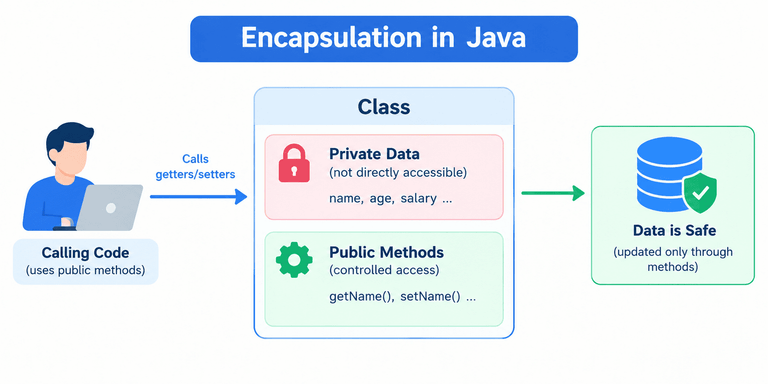
Encapsulation is used in almost every type of Java application where developers need to organize data, control access to an object’s state, and enforce rules when that state changes.
By keeping fields private and exposing carefully designed methods, developers can make their classes easier to maintain, test, and reuse.
Let’s explore some common real-world applications of encapsulation in Java.
1. Banking Applications
Banking applications use encapsulation to manage account information, such as account numbers and balances. Encapsulation helps protect this information by declaring variables as private and allowing access through controlled methods.
For example, a bank account should not allow other classes to change its balance directly. Instead, it should provide methods such as deposit() and withdraw() to perform transactions while checking the requested amounts.
class BankAccount {
private int accountNumber;
private String accountHolder;
private double balance;
// Constructor
public BankAccount(int accountNumber, String accountHolder,
double initialBalance) {
this.accountNumber = accountNumber;
this.accountHolder = accountHolder;
if (initialBalance >= 0) {
this.balance = initialBalance;
} else {
System.out.println("Invalid initial balance!");
this.balance = 0;
}
}
// Deposit money
public void deposit(double amount) {
if (amount > 0) {
balance += amount;
System.out.println("Deposited: " + amount);
} else {
System.out.println("Invalid deposit amount!");
}
}
// Withdraw money
public void withdraw(double amount) {
if (amount <= 0) {
System.out.println("Invalid withdrawal amount!");
} else if (amount > balance) {
System.out.println("Insufficient balance!");
} else {
balance -= amount;
System.out.println("Withdrawn: " + amount);
}
}
// Getter method
public double getBalance() {
return balance;
}
// Display account details
public void displayDetails() {
System.out.println("Account Number: " + accountNumber);
System.out.println("Account Holder: " + accountHolder);
System.out.println("Balance: " + balance);
}
}
public class Main {
public static void main(String[] args) {
// Create a bank account
BankAccount account =
new BankAccount(1001, "Rahul", 10000);
System.out.println("Initial Account Details:");
account.displayDetails();
// Deposit money
System.out.println("\nDeposit Transaction:");
account.deposit(2000);
// Withdraw money
System.out.println("\nWithdrawal Transaction:");
account.withdraw(3000);
// Attempt an invalid withdrawal
System.out.println("\nInvalid Withdrawal:");
account.withdraw(15000);
// Display final balance
System.out.println("\nFinal Balance: " + account.getBalance());
}
}
Output:
Initial Account Details:
Account Number: 1001
Account Holder: Rahul
Balance: 10000.0
Deposit Transaction:
Deposited: 2000.0
Withdrawal Transaction:
Withdrawn: 3000.0
Invalid Withdrawal:
Insufficient balance!
Final Balance: 9000.0
Step-by-Step Explanation
- Private variables: The
accountNumber,accountHolder, andbalancefields are private, so other classes cannot access them directly. - Constructor: The constructor initializes the account details and checks that the initial balance is not negative.
- Deposit method: The
deposit()method adds money only when the deposit amount is greater than zero. - Withdrawal method: The
withdraw()method checks whether the amount is valid and whether sufficient funds are available before deducting money. - Getter method: The
getBalance()method returns the current balance without allowing direct modification. - Display method: The
displayDetails()method displays the account number, account holder’s name, and balance. - Transaction processing: The program deposits ₹2,000 and withdraws ₹3,000. The balance changes from ₹10,000 to ₹12,000 and then to ₹9,000.
- Invalid transaction: The program rejects the ₹15,000 withdrawal because the account contains only ₹9,000. The balance remains unchanged.
How Does This Example Demonstrate Encapsulation?
This program demonstrates encapsulation by keeping account data private and providing controlled methods for depositing and withdrawing money.
- Data hiding: The balance cannot be modified directly by unrelated classes.
- Controlled access: Deposits and withdrawals happen through designated methods.
- Data validation: The program rejects invalid amounts and withdrawals exceeding the available balance.
- Data integrity: Invalid transactions do not change the existing balance.
Practical use: Similar design principles help developers implement controlled account operations in banking software. Real financial systems require additional transaction processing, authorization, auditing, and security measures.
2. Student Management Systems
A Student Management System is a real-world application of encapsulation in Java. It is used to manage student information, such as student ID, name, marks, and grades.
Encapsulation helps protect student data by declaring variables as private and providing public methods to access and update them in a controlled way.
class Student {
private int studentId;
private String name;
private double marks;
// Constructor
public Student(int studentId, String name, double marks) {
this.studentId = studentId;
this.name = name;
setMarks(marks);
}
// Getter for student ID
public int getStudentId() {
return studentId;
}
// Getter for name
public String getName() {
return name;
}
// Setter for name
public void setName(String name) {
if (name != null && !name.trim().isEmpty()) {
this.name = name;
} else {
System.out.println("Invalid student name!");
}
}
// Getter for marks
public double getMarks() {
return marks;
}
// Setter for marks with validation
public void setMarks(double marks) {
if (marks >= 0 && marks <= 100) {
this.marks = marks;
} else {
System.out.println("Invalid marks! Enter marks between 0 and 100.");
}
}
// Display student details
public void displayDetails() {
System.out.println("Student ID: " + studentId);
System.out.println("Student Name: " + name);
System.out.println("Marks: " + marks);
}
}
public class Main {
public static void main(String[] args) {
Student student = new Student(101, "Rahul", 85);
System.out.println("Student Details:");
student.displayDetails();
System.out.println("\nUpdating Student Marks:");
student.setMarks(92);
System.out.println("Updated Marks: " + student.getMarks());
System.out.println("\nTrying to Set Invalid Marks:");
student.setMarks(120);
System.out.println("\nFinal Student Details:");
student.displayDetails();
}
}
Output:
Student Details:
Student ID: 101
Student Name: Rahul
Marks: 85.0
Updating Student Marks:
Updated Marks: 92.0
Trying to Set Invalid Marks:
Invalid marks! Enter marks between 0 and 100.
Final Student Details:
Student ID: 101
Student Name: Rahul
Marks: 92.0
Explanation
1. Private data members
private int studentId;
private String name;
private double marks;
These variables store student information. Because they are declared private, they cannot be accessed directly from outside the Student class.
2. Constructor
public Student(int studentId, String name, double marks) {
this.studentId = studentId;
this.name = name;
setMarks(marks);
}
The constructor initializes the student’s ID and name. It uses setMarks() to validate the initial marks.
3. Getter methods
public double getMarks() {
return marks;
}
Getter methods allow other classes to read private data through controlled access.
4. Setter method with validation
public void setMarks(double marks) {
if (marks >= 0 && marks <= 100) {
this.marks = marks;
} else {
System.out.println(
"Invalid marks! Enter marks between 0 and 100."
);
}
}
This method accepts marks only between 0 and 100. If someone tries to assign 120, the method rejects the value and preserves the previous marks.
5. Displaying student details
The displayDetails() method displays the student’s ID, name, and marks without allowing direct access to the private variables.
Practical use: A student management application can use this approach to reduce invalid data entry and maintain consistent student records.
Note that a complete system may need additional validation, such as trimming whitespace or handling missing values.
3. Employee Management Systems
Employee management systems store and manage employee information, such as employee IDs, names, job titles, and salaries. Encapsulation in Java helps protect this information by restricting direct access to variables and providing controlled methods to read or update them.
For example, a company may want to prevent an employee’s salary from being set to a negative value. We can achieve this by declaring the salary variable as private and using a setter method to validate salary changes.
Here is the complete Java program demonstrating encapsulation in an Employee Management System, including private variables, a constructor, getter and setter methods, salary validation, and employee details.
class Employee {
private int employeeId;
private String name;
private double salary;
// Constructor
public Employee(int employeeId, String name, double salary) {
this.employeeId = employeeId;
this.name = name;
setSalary(salary);
}
// Setter method with validation
public void setSalary(double salary) {
if (salary >= 0) {
this.salary = salary;
} else {
System.out.println("Invalid salary!");
}
}
// Getter method
public double getSalary() {
return salary;
}
// Display employee details
public void displayDetails() {
System.out.println("Employee ID: " + employeeId);
System.out.println("Name: " + name);
System.out.println("Salary: " + salary);
}
}
public class Main {
public static void main(String[] args) {
// Create an employee object
Employee emp = new Employee(101, "Rahul", 30000);
// Display initial employee details
System.out.println("Employee Details:");
emp.displayDetails();
// Update salary
emp.setSalary(35000);
System.out.println("\nAfter Salary Update:");
emp.displayDetails();
// Attempt to set an invalid salary
System.out.println("\nTrying to Set Invalid Salary:");
emp.setSalary(-5000);
// Display details after the invalid update
System.out.println("\nFinal Employee Details:");
emp.displayDetails();
}
}
Output:
Employee Details:
Employee ID: 101
Name: Rahul
Salary: 30000.0
After Salary Update:
Employee ID: 101
Name: Rahul
Salary: 35000.0
Trying to Set Invalid Salary:
Invalid salary!
Final Employee Details:
Employee ID: 101
Name: Rahul
Salary: 35000.0
How encapsulation works here:
privatevariables restrict direct access to employee data.setSalary()validates salary updates.getSalary()provides controlled access to the salary.displayDetails()displays the employee’s information.- An invalid salary does not overwrite the existing valid salary.
Run the program: Save the code in Main.java, then compile and execute it using javac Main.java followed by java Main.
4. E-Commerce Applications
E-commerce applications manage products, shopping carts, orders, and payments. Consider a shopping cart. It should control how products are added, removed, and counted rather than allowing other classes to change its internal item collection arbitrarily.
Encapsulation allows the cart to expose operations such as:
addItem()removeItem()getTotalPrice()getItemCount()
These methods can enforce rules such as rejecting invalid quantities and calculating totals consistently.
5. User Authentication Systems
Java applications often manage user information, authentication status, and session-related data. Encapsulation can help restrict direct access to internal fields and expose only the operations required by the application.
For example, a class may provide methods to check authentication status instead of allowing other classes to modify that status directly.
However, encapsulation alone does not authenticate users or secure passwords. Secure authentication also requires appropriate password hashing, authorization, session management, and other security controls.
6. Enterprise Java and Spring Boot Applications
Encapsulation is also useful in enterprise Java applications built with frameworks such as Spring Boot.
For example:
- A service class exposes business operations through methods.
- A domain object controls changes to its state.
- A component hides implementation details behind a public interface.
- A class can change its internal implementation without requiring every caller to change.
In a Spring Boot application, a service might expose a placeOrder() operation while keeping internal validation and processing logic inside the service and related domain classes. This makes it easier to organize complex applications into manageable components.